Browse workflows
Keep checkout focused on the sale in front of your team.
Use a staff-facing POS workflow to find products, complete sales, and record completed receipts with the terminal context your team is working in.
FOR RETAIL OWNERS AND STORE SUPERVISORS
How the workflow works
- 01
Prepare the terminal
Select the active branch and terminal context before the cashier begins a sale.
- 02
Build the sale
Search or scan products and review the cart before completing the transaction.
- 03
Record the result
After confirmation, the completed sale has its corresponding receipt record.
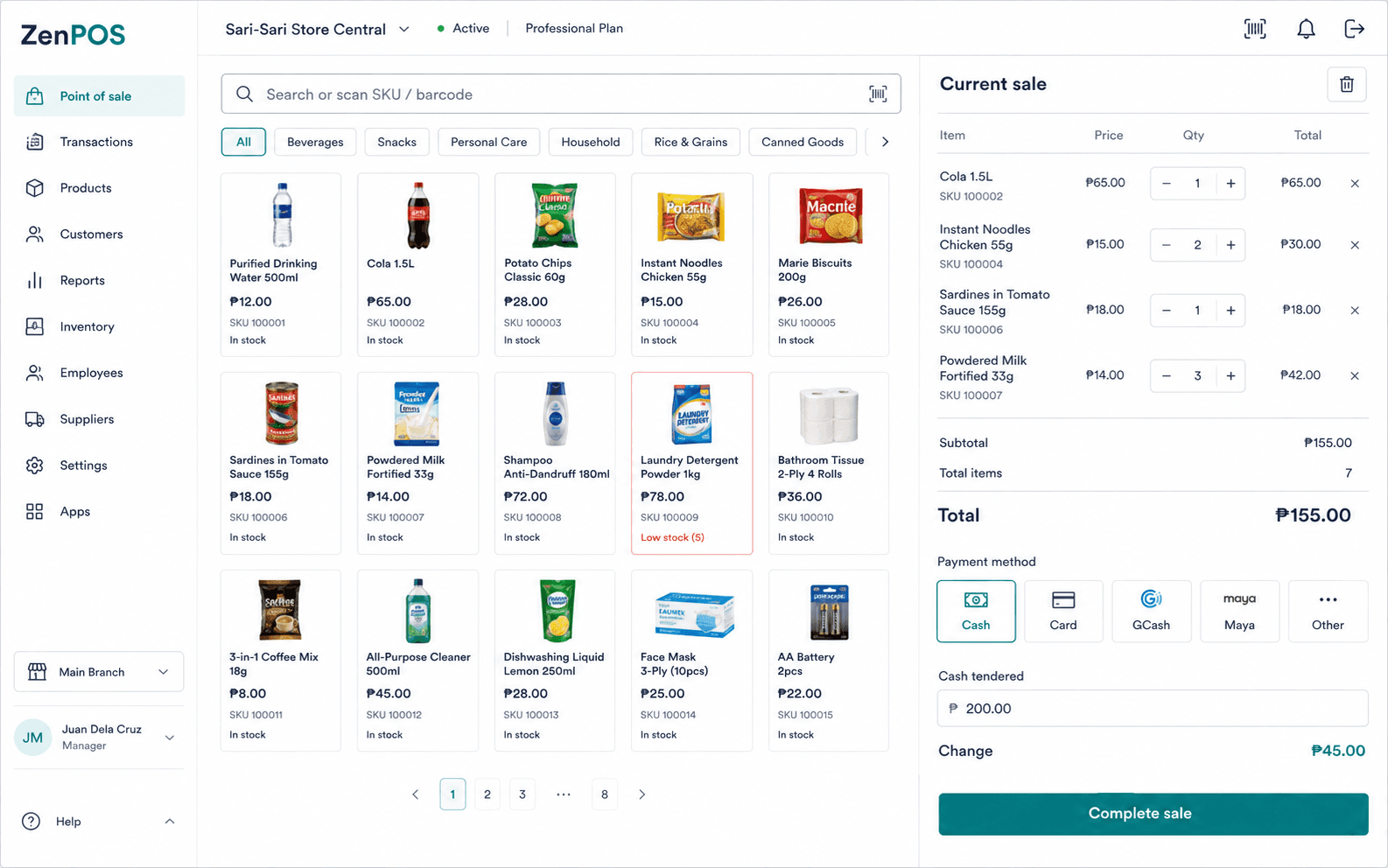
Use this workflow with the right context.
- Confirm the active branch and terminal before checkout.
- Open the required shift before accepting a cash sale when cash control is enabled.
- Treat the receipt as the record of a completed sale, not a fiscal invoice.
Confirmed capabilities
Product search
Find items by scanning or searching the product catalog.
Sales and receipts
Keep completed sales and their receipt records distinct.
Terms and prerequisites
What is the difference between a sale and a receipt?
A sale is the completed transaction. A receipt records that completed sale.
What is a terminal?
A terminal is a POS station associated with a branch.
Set up your benta workspace.
Start with your organization, main branch, and first terminal.